Workflow · Guide
How to analyze a CS2 demo
To analyze a CS2 demo, choose one question, use the statistics to select relevant rounds, and inspect the recorded sequence in replay. Compare a successful round with an unsuccessful one before choosing a practice change. The Mirage example below shows this routine using a real public match.
Reviewed · Editorial method
A focused review keeps the question and evidence together. You do not need to settle every disagreement about a match in one session.
Check what is available
Open a match through the FACEIT tracker. Detailed views require the relevant demo processing and publication, with permitted access. A link opening successfully does not promise that all analysis or video is ready.
An eligible unparsed overview can offer a match-scoped upload. The demo guide explains that surface; it is not a universal arbitrary-demo uploader.
Choose a question before a conclusion
Use performance, ratings and round context to find something worth investigating. A low ADR or KAST may point you toward particular rounds, but neither identifies the cause by itself.
For an opening death, ask what support was available. For a force-buy, compare equipment and the fights that followed. For a rotation, inspect the known event sequence without assuming what a player intended.
Look for examples and counterexamples
Use the timeline and economy to select relevant rounds. Include a similar round where the result was different. A repeated loss can have more than one explanation; a small sample is not a reliable universal rule.
Inspect the recorded sequence
Open available 2D replay. Check positions, utility and event timing, keeping its sampling limits in view. Use in-game playback when your question needs first-person detail that a radar reconstruction cannot supply.
Worked example: review a 1–6 Mirage comeback
In this public FACEIT match on Mirage, played on 24 August 2026, team_KIFIR4K trailed 1–6 after round 7 and finished 13–11. The team won 12 of the remaining 17 rounds. That gives us a review question: what happened in round 8, the first win after the deficit, and how did a later lost round differ?
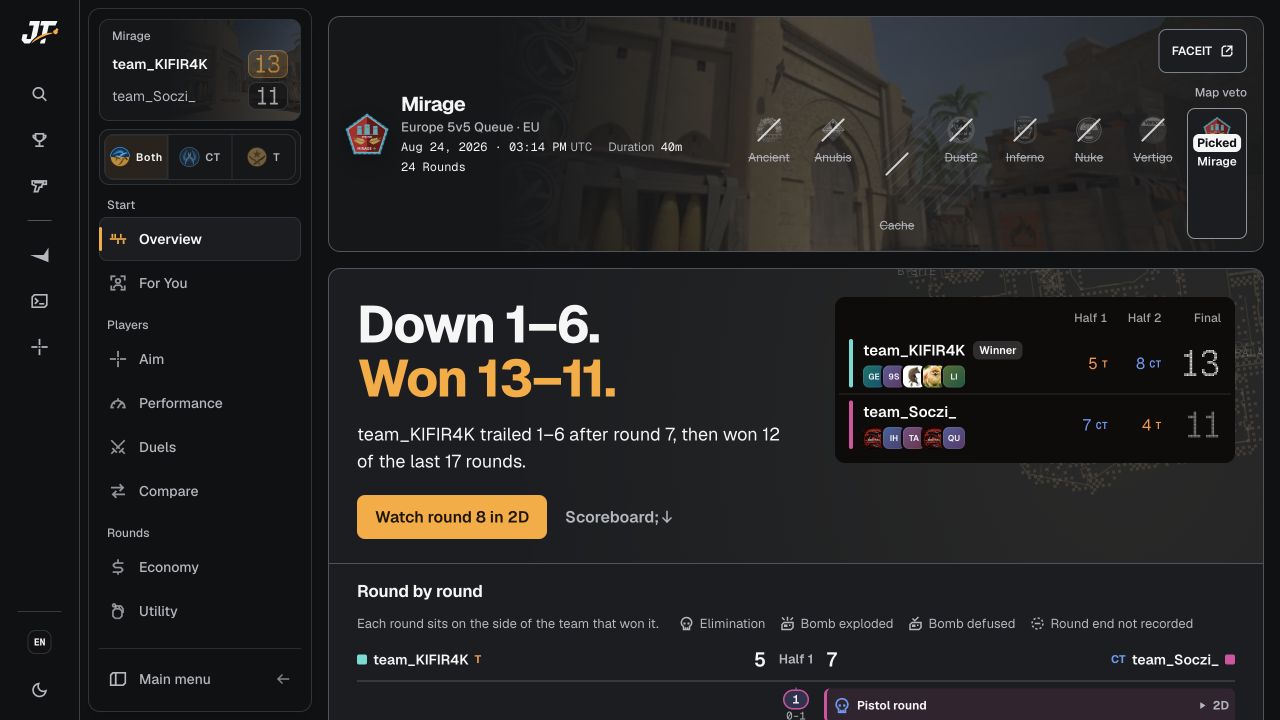
What does round 8 actually show?
Open round 8 in the 2D replay. Select the opening-kill marker, then inspect the play-by-play. The recorded sequence includes:
| Time into round | Recorded event | Next review question |
|---|---|---|
| 0:09.3 | Linszu kills Toczy with an SSG 08. | Where was the opening fight, and what support was available? |
| 0:39.2 | Imback_hypex kills Dan4uk228. | What did the team lose at this point? |
| 0:40.6 | KIFIR4K kills Imback_hypex; the replay labels it a trade. | What positions allowed the response about 1.4 seconds later? |
| 0:55.4 | Linszu plants the bomb. | What changed between the trade and the plant? |
| Round end | team_KIFIR4K wins by elimination; the match score becomes 2–6. | Which parts of this sequence recur in other rounds? |
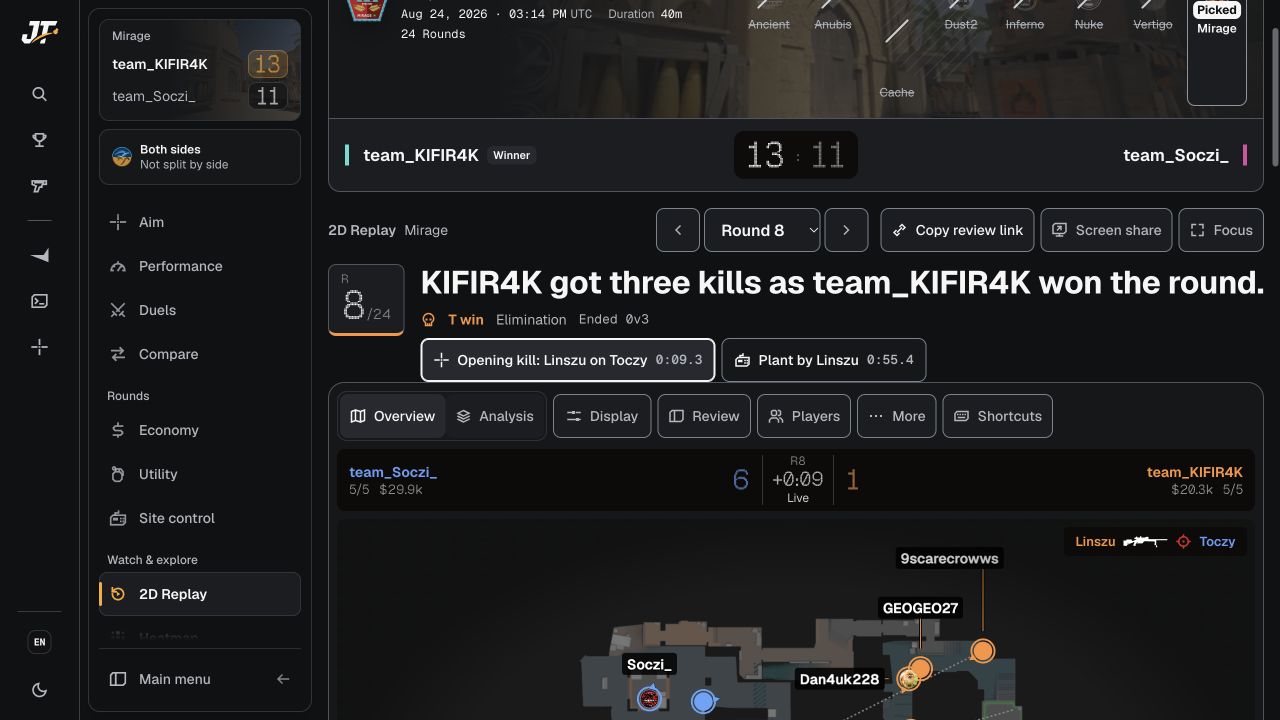
The sequence establishes an opening kill, a quick response to a teammate’s death, a plant and a round win. It does not establish player intent or prove that one action caused the comeback. Keep those interpretations as questions you can test against other recorded rounds.
Compare a round that ended differently
Open round 10. team_KIFIR4K is still on T, but team_Soczi_ wins by defusing, taking the score to 3–7. Both rounds include a plant; the outcomes differ. Inspect the post-plant event sequence, remaining players and available utility before proposing an explanation. A plant alone is not evidence that a round was secured.
Use the economy view and utility view if your next question needs their records. Keep the same match and round scope as you move between views.
Source and scope
We inspected the public match overview and round 8 replay on 6 October 2026. The scores and events above come from those recorded views; the review questions are editorial interpretation. This is one match, not a benchmark for Mirage, a skill tier or a guarantee of improvement. Live availability may change with processing and publication status.
Leave with a change you can test
Choose one concrete experiment: coordinate a particular flash, change the timing of a supported entry, or practice one route. Check comparable situations in later reviews. The aim is to test an explanation; this guide makes no promise about rank gains or a guaranteed improvement rate.
A practical starting point
Check the match
Open a FACEIT match link and read its processing and access status. An eligible overview may offer a match-scoped demo upload.
Choose one question
Select a question about a fight, buy, utility sequence or rotation rather than diagnosing the whole game from a score.
Find relevant rounds
Use available performance, timeline and economy records to select examples and counterexamples.
Inspect the evidence
Check recorded events and available replay, including sample and timing limits.
Test one change
Name a concrete practice change, then review comparable situations later to see whether it helped.
Quick answers
Frequently asked questions
Do I need to watch the whole demo in-game?
You can start with selected rounds in an available browser 2D replay. In-game playback may still be useful for first-person detail. JumpThrow's replay depends on processed and accessible round data.
What should I look at first?
Choose a question, then check whether the relevant data is available. Read the overview and the appropriate metric definitions before selecting rounds to inspect.
Does a low KAST explain a bad game?
No. KAST records a round outcome measure, not its cause. Review the relevant role, support and event sequence before deciding why a player had fewer qualifying rounds.
Can a comeback prove that a strategy worked?
No. A comeback establishes the score sequence. Use recorded fights, equipment and utility to investigate specific rounds, then compare similar situations. One match cannot establish a general improvement rate or explain player intent.
Put the guide to work · JumpThrow
Put the guide to work.
Use JumpThrow for the next step, or keep exploring the field guide.